01
Connect
Use a stream URL or OBS feed
Start from YouTube, Twitch, or from OBS without changing your creator workflow.
Klair watches your stream and turns the real moments into viral-ready clips. When your team wants to step in, @klair saves the moment instantly.
Autonomous engine
Watches chat, audio, visuals, and transcript context together.
@klair override
Admins can force-save a moment in chat with an optional note.
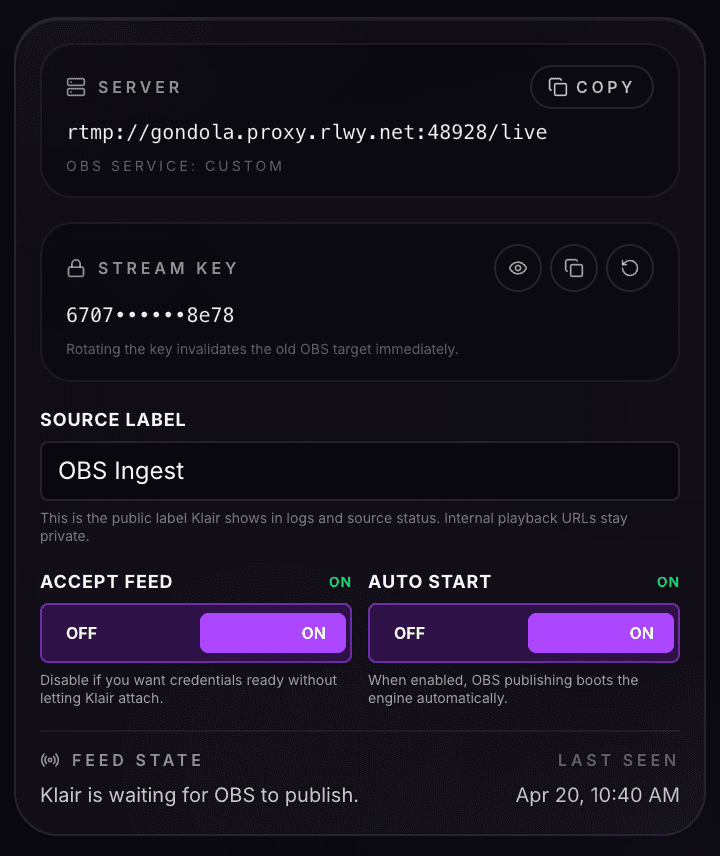
OBS ingest
Private feed in, auto-start engine out, ready for real broadcasts.
Connects with the platforms creators already use
Connect a live source, let Klair watch the stream, step in with @klair when humans know first, then review and publish without leaving the dashboard.
Connect
Start from YouTube, Twitch, or from OBS without changing your creator workflow.
Watch
Klair weighs chat bursts, audio spikes, visual motion, and transcript context before it commits to a clip.
Override
When your team sees the moment first, an admin can save it instantly from chat and attach a caption for the edit.
Ship
Jump through the transcript, refine the cut, and move straight into Shorts and TikTok-ready posting.
Klair now weighs chat bursts, audio excitement, visual motion, and transcript context together. The goal is not to clip more. It is to clip the moments that actually deserve review.
Autonomous clipping should never mean giving up control. Admins can save a moment instantly from chat, attach an optional note, and keep the stream moving without opening the dashboard.
Live chat control
Moderator desk for manual saves
chat
LMAO what is bro doing ??!!
chat
that swing was wild
chat
admin trigger@klair W swing
result
clip queued instantly
note
message travels with the clip
transport
OBS / RTMP
security
rotating keys
engine
auto-start
Klair no longer has to feel like a public URL tool. Route your OBS output into a private ingest path, rotate keys safely, and let the engine auto-start as soon as you're live.
Once Klair catches the moment, the handoff stays fast. Search the transcript, jump to the line that matters, and tighten the cut without scrubbing through dead footage.
Klair now filters obvious non-moments before they waste attention, so your queue stays focused on clips worth touching.
Save the lead-up, not just the aftermath.
Klair keeps the recent context around the event so the clip starts before the reaction lands.
Mods can step in without slowing the show.
Human override stays one chat command away, which is exactly where a live team needs it.
Private feeds fit cleanly into the engine.
OBS ingest gives the product a real production path beyond public links.
Signals have to agree before the clip lands.
That means fewer empty triggers from menu motion, random noise, or disconnected chat spikes.